2008年12月12日,Discuz 7.0 和 UCenter Home 1.5 和 UCenter 1.5 将同期发布。
个人非常期待这个时候的到来,等了很久,终于来了,那番喜悦立即涌上心头。
我最期待的就是 Discuz 7.0 全新设计的界面,非常符合趋势的发展。全新的技术实现了所有人的梦想,全新的界面将吸引更多人,特别是让新手更容易接触这庞然大物,因为目前主流的网民已经正在年轻化。
个人非常期待,这个时候的到来。
我们准备这一天的到来吧!

2008年12月12日,Discuz 7.0 和 UCenter Home 1.5 和 UCenter 1.5 将同期发布。
个人非常期待这个时候的到来,等了很久,终于来了,那番喜悦立即涌上心头。
我最期待的就是 Discuz 7.0 全新设计的界面,非常符合趋势的发展。全新的技术实现了所有人的梦想,全新的界面将吸引更多人,特别是让新手更容易接触这庞然大物,因为目前主流的网民已经正在年轻化。
个人非常期待,这个时候的到来。
我们准备这一天的到来吧!
The author fyhao has written a Java program when he was very boring.
It is a showFadeMessage java program, a paint panel, with a thread to control the animation.

Figure A UML Diagram
PaintPanel.java
import java.awt.*;
import javax.swing.*;
import java.awt.event.*;

public class PaintPanel extends JPanel implements MouseListener, MouseMotionListener {
    private int x,y,w,h;
    private showFadeMessage fadeMsg;
    private controlThread t;
    public PaintPanel() {
        x=0;
        y=0;
        w=10;
        h=10;
        fadeMsg = new showFadeMessage("");
        t = new controlThread();
        t.start();
        addMouseListener(this);
        addMouseMotionListener(this);
    }
    public void setx(int x) throws IllegalNumberException {
        if(x < 0 || x > 200) throw new IllegalNumberException(1);
        this.x = x;
    }
    public int getx() {
        return x;
    }
    public void sety(int y) throws IllegalNumberException {
        if(y < 0 || y > 200) throw new IllegalNumberException(1);
        this.y = y;
    }
    public int gety() {
        return y;
    }
    public void setw(int w) throws IllegalNumberException {
        if(w < 0 || w > 200) throw new IllegalNumberException(2);
        this.w = w;
    }
    public int getw() {
        return w;
    }
    public void seth(int h) throws IllegalNumberException {
        if(h < 0 || h > 200) throw new IllegalNumberException(2);
        this.h = h;
    }
    public int geth() {
        return h;
    }
    public void paintComponent(Graphics g) {
        super.paintComponent(g);
        setBackground(Color.WHITE);
        g.drawString("X: " + x + " Y: " + y + " Width: " + w + " Height: " + h,20,20);
        g.drawRect(30,30,200,200);
        g.setColor(new Color(0,0,255));
        g.fillRect(x+30,y+30,w,h);
        try {
            if("".equals(fadeMsg.getText()) == false && fadeMsg.getGray() < 255) {
                g.setColor(new Color(fadeMsg.getGray(), fadeMsg.getGray(), fadeMsg.getGray()));
                g.drawString(fadeMsg.getText(), 100,100);
            }
        } catch (Exception e) {}
    }
    public void mouseExited(MouseEvent e) {
        fadeMsg.setText("Mouse Exited");
    }
    public void mouseEntered(MouseEvent e) {
        fadeMsg.setText("Mouse Entered");
    }
    public void mouseReleased(MouseEvent e) {
        fadeMsg.setText("Mouse Released");
    }
    public void mousePressed(MouseEvent e) {
        fadeMsg.setText("Mouse Pressed");
    }
    public void mouseClicked(MouseEvent e) {
        fadeMsg.setText("Mouse Clicked");
    }
    public void mouseMoved(MouseEvent e) {}
    public void mouseDragged(MouseEvent e) {
        try {
            setx(e.getX() - 30);
            sety(e.getY() - 30);
        } catch (IllegalNumberException ine) {}
        repaint();
    }
     class controlThread extends Thread {
        public void run() {
            while(true) {
               try {
                    sleep(100);
                    fadeMsg.setGray(fadeMsg.getGray() + 15);
                } catch (InterruptedException e) {}
                repaint();
            }
        }
    }
}
showFadeMessage.java
public class showFadeMessage {
    private String text = "";
    private int gray;
    public showFadeMessage(String text) {
        this.text = text;
        gray = 255;
    }
    public void setText(String text) {
        this.text = text;
        setGray(0);
    }
    public void setGray(int gray) {
        this.gray = gray;
    }
    public String getText() {
        return text;
    }
    public int getGray() {
        return gray;
    }
}
IllegalNumberException.java
public class IllegalNumberException extends Exception {
    private int type;
    public IllegalNumberException(int type) {
        this.type = type;
    }
    public String getMessage() {
        String r = "";
        switch(type) {
            case 1:
            r = "The X,Y number should not be less than 0 and more than 200";
            break;
            case 2:
            r = "The Width, Height number should not be less than 0 and more than 200";
            break;
            default:
            r = "Unknown Exception";
        }
        return r;
    }
}
TestPaint.java
import javax.swing.*;
import java.awt.*;
import java.awt.event.*;

public class TestPaint extends JFrame implements ActionListener {
    private JTextField tfX, tfY,tfW,tfH;
    private PaintPanel paintPanel;
    private JButton submitBtn, resetBtn;
    public TestPaint() {
        tfX = new JTextField(10);
        tfY = new JTextField(10);
        tfW = new JTextField(10);
        tfH = new JTextField(10);
        tfX.setText("0");
        tfY.setText("0");
        tfW.setText("10");
        tfH.setText("10");
        paintPanel = new PaintPanel();
    }
    public void launchFrame() {
        JPanel leftPanel = new JPanel();
        leftPanel.setLayout(new GridLayout(5,2,10,10));
        leftPanel.add(new JLabel("X: "));
        leftPanel.add(tfX);
        leftPanel.add(new JLabel("Y: "));
        leftPanel.add(tfY);
        leftPanel.add(new JLabel("W: "));
        leftPanel.add(tfW);
        leftPanel.add(new JLabel("H: "));
        leftPanel.add(tfH);
        leftPanel.add(submitBtn = new JButton("Submit"));
        leftPanel.add(resetBtn = new JButton("Reset"));
        submitBtn.addActionListener(this);
        resetBtn.addActionListener(this);
        Container con = getContentPane();
        con.setLayout(new BorderLayout());
        con.add(leftPanel, BorderLayout.WEST);
        con.add(paintPanel, BorderLayout.CENTER);
    }
    public void actionPerformed(ActionEvent e) {
        if(e.getSource() == submitBtn) {
            try {
                paintPanel.setx(Integer.parseInt(tfX.getText()));
                paintPanel.sety(Integer.parseInt(tfY.getText()));
                paintPanel.setw(Integer.parseInt(tfW.getText()));
                paintPanel.seth(Integer.parseInt(tfH.getText()));
                paintPanel.repaint();
            } catch (NumberFormatException nfe) {
                JOptionPane.showMessageDialog(null, "Please ensure that there is no illegal value in the textfield");
            } catch (IllegalNumberException ine) {
                JOptionPane.showMessageDialog(null, ine.getMessage());
            }
        }
        if(e.getSource() == resetBtn) {
            tfX.setText("0");
            tfY.setText("0");
            tfW.setText("10");
            tfH.setText("10");
        }
    }
    public static void main(String args[]) {
        TestPaint test = new TestPaint();
        test.setTitle("Controlling Paint Program");
        test.launchFrame();
        test.setSize(500,300);
        test.setVisible(true);
        test.setResizable(false);
        test.setLocationRelativeTo(null);
        test.setDefaultCloseOperation(JFrame.EXIT_ON_CLOSE);
    }
}
Screen shot:

Figure B Screen shot of the paint program
Function:
Four textfield with X-axis, Y-axis, weight and height of the blue box. Whenever a user click the "Submit" button, the blue box at the right will change to its position and also change the size depend on the value the user entered. And also a "Reset" button to reset the value of the textfield.
At the right screen, as we can see the position and the size's data of the blue box. In the center of the right screen, we can see the message shown with bright text, but it will fade to invisible, in animation slide. Whenever the user's mouse move out move in it will show the messages...
And also the user capable of drag the blue box and the data at the top will change automatically.
1.中国被爱可以在线 -- WAP在线浏览器
原理:基于M3Gate V1.2组件的WAP浏览器,把M3Gate搬上了IE。
优点:完全同于M3Gate V1.2浏览器WAP站点,可以选择编码方式,调试WAP程序,查看WML源代码等。
缺点:需要安装M3Gate V1.2浏览器或WAPDisplayer V1.5,用户电脑中要有支持的该浏览的基础组件。同时需要设置IE浏览器的相关属性。
参考:
Yesky> 软件> 工具软件 让我教你如何用IE来浏览WAP网站
网易 > 网易科技 > 网易学院·教程 让我教你如何用IE来浏览WAP网站截图:
相关下载:
2.WAP之家 -- WWB在线WAP浏览器
原理:基于M3Gate V1.2浏览器,把M3Gate搬上了IE。
优点:完全同于M3Gate V1.2浏览器WAP站点,可以选择编码方式,调试WAP程序,查看WML源代码等。
缺点:需要安装M3Gate浏览器或WWB在线WAP网站浏览器,用户电脑中要有支持的该浏览的基础组件。同时需要设置IE浏览器的相关属性。
参考:
WAP Web Browser 让您的无线生活更简单
拥有WWB 让您WAP更轻松截图:
相关下载:
3.UU视窗--PC上的WAP浏览器
地址:http://win.uucun.com/frame.jsp
原理:通过对WML文件的分析,将代码替换为相应HTML代码进行显示。
优点:不需要下载支持软件,对图片格式的支持性好(IE支持)。
缺点:不能调试WML程序,因为WML多个卡片将显示于一个网页,不支持WML中的任务、事件,显示的内容是提取的原WAP网页中的图片、链接以及文字。
简介:UU视窗”就是悠悠村为用户使用方便开发的一款PC上的WAP浏览器。
让用户电脑在不需要安装任何浏览器或插件的前提下, 直接访问手机WAP站。截图:
4.Timewe Wap浏览器
原理:通过对WML文件的分析,将代码替换为相应HTML代码进行显示。
优点:不需要下载支持软件,对图片格式的支持性好(IE支持)。
缺点:不能调试WML程序,因为WML多个卡片将显示于一个网页,不支持WML中的任务、事件,显示的内容是提取的原WAP网页中的图片、链接以及文字。
简介:使用Timewe Wap浏览器,免除下载、安装软件、插件之累,免去用手机访问新站时强行定制之嫌,触摸火热wap资讯、内容前的种种不畅、顾忌的感觉不再有!
截图:
5.其他WAP在线浏览器
国外--WapSilon
地址:http://www.wapsilon.com/
简介:在该网页WAP URL中输入WAP网站地址后,再从Fullscreen(全屏)、7210、7110、6210这四者中挑选好手机模拟器类型,最后点击GO按钮就行了。
WAP在线浏览器(WAP Web Browser),是基于优秀WAP模拟器M3gate组件开发的WAP网站在线浏览绿色软件,同时我们推出了网络版的WWB,它实现了中文化、无安装的M3gate模拟环境,并能在线的浏览WAP网站,如果您有网站(网页)您还可以把代码加到自己的网站中去,给您的网站添加新活力,使用户更能轻松的浏览WAP网站,免去了您手机开通GPRS的费用,让您以WEB网站的速度浏览WAP网站,本软件可以无任何限制地免费给大家使用
热血三国我的截图。。。来看看吧!
http://3kingdom.com.my 推荐大家玩这个哦!


玩了之后,快来这里讨论吧!http://bbs.qxinnet.com/forumdisplay.php?fid=362&page=1
此文章是教导如何设置清心个人空间与WordPress部落格互通的功能。
此功能的作用是:当您在您的 WordPress 发表了部落格,您所发表的最新文章的标题,将会以事件的方式发送到清心个人空间。而清心个人空间的会员,就能通过好友近况或网站近况,查询到您的部落格发表动态,也能点击去观看您所发表的部落格。
这里是最近所发表的WordPress部落格事件的过滤 点击查看。
它就会出现类似这段话:

此功能的好处是:可以吸引其他更多人进去您的部落格,增加您的部落格访问量。并且也能让在清心个人空间的好友很方便的通过这个途径得知您的近况哦!
在安装此功能的前提是,您必须拥有一个清心个人空间会员帐号(http://u.qxinnet.com) 并拥有一个 WordPress 部落格帐号,可以是 http://wordpress.com 所提供的免费部落格,或者是独立空间并使用 WordPress 版本的部落格。
安装步骤:
1. 请登录清心个人空间,在右上角点击 设置,然后点击 额外功能,选择 WordPress 设置,或直接点击这个链接:http://u.qxinnet.com/cp.php?ac=extra&op=wordpress。

进入了这个页面,首先,您必须填写您的部落格标题,以方便我们辨识您是部落格的合法主人。
然后,请您填写您的部落格访问网址,基本上,以 http:// 开头,并以 / 结尾。
之后点击提交,部落格代码就会显示出来或更新。每点击一次提交,部落格代码都会更新不一样。
接下来,请点击复制,以复制这个代码。
2. 请登录您的 WordPress 的后台。通常后台的进入方法,就是您的部落格网址之后加上 /wp-admin

然后,请点击 My Dashboard。

然后,请点击 Design。

然后,请点击 Widgets。
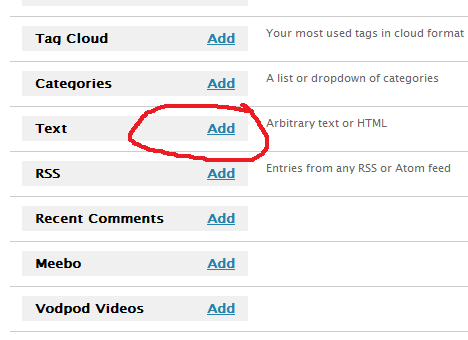
之后,在下面一连串的Widget中,我们需要添加,即 Add 一个 Text 的 Widget。

之后,请看右边,会出现一个叫做 Text 的Widget 设置框框,底下还有一个叫做 Save Changes 的按钮。
请点击以上这个图片右上角的 Edit,以进行编辑设置。

之后,您就会看到有两个框框。上面的框框是 Widget 的标题,您可以任意填写。
第二个比较大的框框,就是 Widget 代码了。
请把刚才在清心个人空间所设置的部落格代码 粘贴 来这里。
当一切设置好后,您可以到部落格首页去查看有没有显示东西。
3. 当一切都设设置好后,在部落格首页页面将会出现以下图示。
若一切设置顺利的话,将会出现这个图片:
若一切设置有误的话,将会出现这个图片:
若出现错误的话,有可能是您的部落格网址填写有问题。那么您必须回到清心个人空间设置的页面,重新填写您的部落格网址,尝试各种可能的方式,重新提交,然后得到最新的部落格代码粘贴来这里,再去部落格页面看看正常不正常。
注意事项
基本上,如果是独立空间的部落格,就必须多注意一下网址的编写。假设您的部落格所在网址是 http://www.abc.com/ 这样的话,您则必须填写之前的那个网址。但如果出现的问题,可以尝试 http://abc.com/
如果您的部落格是 subdomain 形式的,比如 http://fyhao.wordpress.com/,您就填写这样的网址即可。
如果您的部落格是 在 folder 之下的,比如 http://www.abc.com/folder/ ,则填写这样的下去。
一切好之后,测试吧!
当一切都正常后,基本上这个系统已经把您最新的部落格标题发上去清心个人空间了。当然您可以再另外发表一篇部落格,当点击 Publish 后,回到部落格首页,系统就会自动发送标题过去了。
之后,您便可到 http://u.qxinnet.com 首页查看您的事件是否存在。
注:
理论上,图片出现清心博客圈,则一切设置都会是正常,如果有任何问题发生,一定会显示勿非法盗链。
图片样式
目前只提供一种图片样式可供选择,之后我们会陆续增加个性化设置哦!
最后,感谢大家的支持,没有你们的支持,就没有我们的研发动力。


